Exploring the Versatility of Humming Google Slide Template
The Humming Google Slide Template is a powerful tool designed to meet the needs of a wide range of users, from educators and presenters to business professionals and creative designers. With its comprehensive set of features, this template offers a seamless way to create visually appealing and highly functional presentations. Whether you're preparing a lecture, pitching an idea, or showcasing your work, the Humming Google Slide Template provides the flexibility and structure needed to make your content stand out.
Comprehensive Features of the Humming Google Slide Template
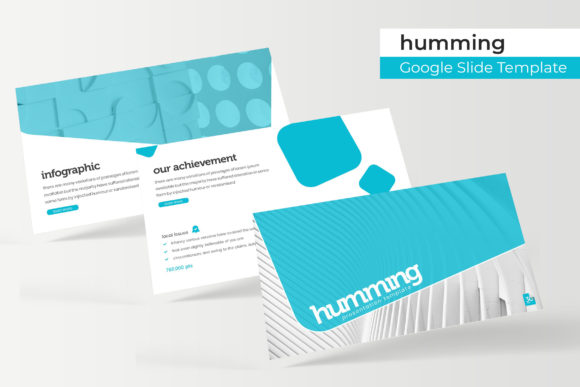
One of the standout aspects of the Humming Google Slide Template is its extensive collection of 150 slides, divided into five premade color schemes, with 30 slides for each template. This variety ensures that users can find a style that aligns with their brand, project theme, or personal preference. Each color variation is carefully crafted to maintain visual consistency while offering a fresh look for different contexts.
In addition to the color options, the template includes handcrafted infographics in PowerPoint format. These infographics are ideal for presenting complex data in a clear and engaging manner. The use of pixel-perfect illustrations adds a professional touch, making it easier for audiences to grasp key concepts at a glance.
Customization and Editability
A significant advantage of the Humming Google Slide Template is its resizable and editable graphic picture placeholders. These placeholders allow users to easily insert images, charts, or other visual elements without disrupting the overall design. The drag-and-drop functionality based on master slides simplifies the process of updating content, ensuring that even those with limited design experience can create polished presentations.
The template also includes section break slides, which help organize content into distinct sections. This feature is particularly useful for long presentations, as it allows for smooth transitions between topics and maintains a logical flow. Additionally, the gallery and portfolio slides provide a structured way to showcase multiple items, whether they are images, projects, or case studies.
What’s Included in the Template Package
The Humming Google Slide Template comes with a complete package of five PPTX files, each tailored for widescreen displays. This ensures compatibility with modern presentation setups and enhances the viewing experience for audiences. Alongside the slide decks, the package includes a readme file that guides users through the setup and customization process.
Another valuable inclusion is the free font download link, which provides access to the first font used in the template. This not only helps maintain a cohesive visual identity but also eliminates the need for additional font purchases. However, it's important to note that the photographs or pictures used in the preview are for illustration purposes only and are not included in the download.
Applications and Use Cases
The versatility of the Humming Google Slide Template makes it suitable for a wide array of applications. Educators can use it to create engaging lesson plans, while researchers can leverage its infographic features to present findings in a compelling way. Business owners and marketers can benefit from the clean layouts and professional aesthetics to craft impactful pitches and reports.
For creators and designers, the template serves as a foundation for developing visually stunning portfolios. The inclusion of gallery and portfolio slides enables them to showcase their work in an organized and attractive manner. Moreover, the ability to customize colors and graphics allows for personalization that reflects individual styles and branding.
Considerations for Effective Use
While the Humming Google Slide Template offers numerous benefits, there are some considerations to keep in mind for optimal results. Users should take the time to understand the structure of the template and how each slide type contributes to the overall presentation. Familiarizing oneself with the master slides and section breaks can significantly enhance the editing process.
Additionally, it's essential to choose the right color scheme that aligns with the presentation's purpose and audience. For instance, a more vibrant color palette might be appropriate for a creative pitch, while a muted tone could be better suited for a corporate report. The template's flexibility allows for such choices, but thoughtful selection can make a big difference in the final outcome.
Finally, users should remember that while the template provides a strong foundation, the success of a presentation ultimately depends on the content and delivery. The visual elements are tools to support the message, not a substitute for clear communication. Combining the features of the Humming Google Slide Template with well-crafted content will lead to more effective and memorable presentations.
Conclusion
The Humming Google Slide Template stands out as a valuable resource for anyone looking to create professional and visually appealing presentations. Its combination of features, including diverse color options, customizable graphics, and structured layout, makes it a versatile choice for various applications. By understanding and utilizing the template effectively, users can elevate their presentations and communicate their ideas more clearly and engagingly.